Setup & Configurations
The Manufacturing Batch Size app extends standard manufacturing setup in Dynamics 365 Business Central with batch-oriented logic. Proper configuration ensures that production orders, material consumption, and traceability processes consistently follow defined batch size rules.
This section outlines the key setup areas required to activate and control batch-based production.
Batch Size Assisted Setup
The Assisted Setup will guide you through the installation process of the Batch Size app.
Use the Search icon and select Assisted Setup 🡪 Set up Manufacturing Batch Size.
- Lot No. Information Cards for all tracking codes with Lot Specific Tracking = Yes
Batch Size Configuration
The foundation of the app is the definition of batch size at product level.
Batch size determines how much of an item is produced in a single production run and drives how production orders are created.
When configuring batch size:
- Each relevant item should have a clearly defined batch quantity
- The value should reflect real operational constraints (e.g., machine capacity, recipe size, or regulatory limits)
- Batch size should remain stable to ensure consistent execution and reporting
This configuration ensures that production orders are always aligned with actual manufacturing capabilities and constraints.
Item Setup
Items that are subject to batch control must be configured to support the batch-oriented production model.
Key considerations include:
- Identification of batch-controlled items. Only items that require fixed production quantities should be configured with batch size logic.
- Consistency across Stockkeeping Units (if applicable). If Stockkeeping Units are used, batch behavior should remain consistent unless operationally required otherwise.
Business Rules
The Batch Size Item field is editable, and users can activate or deactivate this setting at any time, regardless of whether the item has associated movements.
- Activating this field will indicate that the item is subject to batch-specific restrictions for production and lot management.
This setup ensures that batch logic is only applied where it is meaningful and required.
Bill of Material (BOM) Setup
Bills of Material play a central role in ensuring that batch production behaves correctly.
Each BOM should be structured to represent the quantities required for one full batch.
When configuring BOMs:
- Component quantities must match the defined batch size
- Consumption should reflect real production usage per batch
- Adjustments or scaling factors should be avoided whenever possible
A correctly configured BOM guarantees that:
- Material consumption is accurate
- Production output is consistent
- Production orders generated by the system are reliable
Lot Tracking
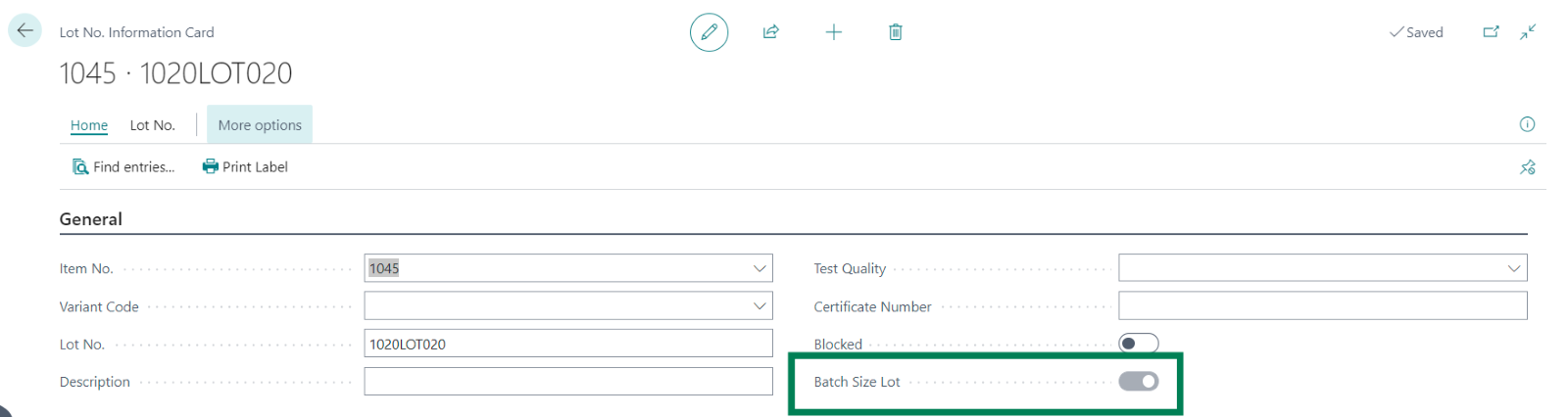
The Lot No Information Card and List Table have been updated to include a new field, Batch Size Lot, which marks lots associated with items produced in batches.
Automatic Activation
When an Output is posted from a Production Order Line for an item with Batch Size Item = YES, the system will automatically set the Batch Size Lot field to True in the Lot No Information Card.
Manual Creation of Lot No Information
If a user manually creates a Lot No Information Card for an item with Batch Size Item = YES, the system will automatically set Batch Size Lot to True.
Configuration Best Practices
To ensure a smooth implementation and reliable operation, consider the following best practices:
- Define batch sizes based on real production constraints
- Avoid mixing batch-controlled and non-batch-controlled logic for the same item
- Keep BOMs aligned strictly with batch quantities
- Use lot tracking consistently where traceability is required
- Regularly review configuration to ensure it reflects current production processes
Following these principles ensures that Manufacturing Batch Size becomes a stable and predictable layer within your manufacturing environment, rather than a source of complexity.