Log Planning Information
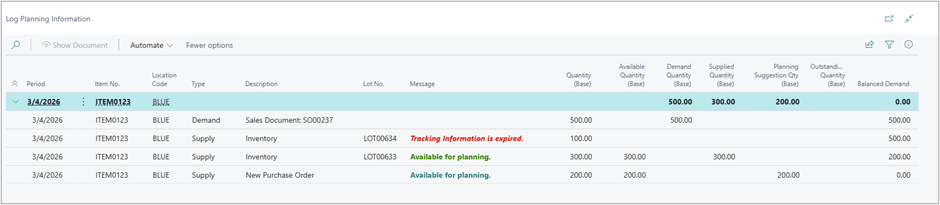
Log Planning Information is an analysis page created to show how the planning engine evaluated supply and demand - specifically which tracked supply was included or excluded, and why. This page is non-editable and is based on the standard Inventory Profile concept.
Page Behavior
- The page opens filtered by the selected worksheet template/name and the last selected line.
- When users run Calculate Regenerative Plan, the log is regenerated for the selected worksheet template/name (existing records are replaced).
- When users Carry Out Action Message, log information related to accepted.
- Reservations override FEFO allocation: if reservation entries exist, the reserved quantity influences the net demand considered.
Page capabilities
- Grouped by Due Date (collapsible groups)
- Export to Excel
- Filter by any field (standard filtering)
Actions
- Show Document: Opens the source document behind the selected log line; Supports Shift + F7 shortcut behavior.
Key Fields
- Log lines reflect whether they represent Supply or Demand, and show aggregated quantities (base UoM):
- Demand Quantity (Base) = total gross requirement in the period.
- Supplied Quantity (Base) = eligible supply applied to demand after exclusion rules.
- Planning Suggestion Qty (Base) = additional quantity proposed by planning after eligible supply is applied.
- Outstanding Quantity (Base) = remaining uncovered quantity before suggestions are carried out.
- Balanced Demand = reconciliation after supply + suggestions allocation.
- Message logic (explains inclusion/exclusion):
- Available supply: “Available for planning” shown in green.
- Excluded supply: “Tracking Information is [expired/blocked] …” shown in red, with relevant tracking fields also red.
- Predicted exclusion (rolling supply): “Predicted expiration date MM/DD/YYYY – supply excluded from planning” shown in red.
Unplanned Items
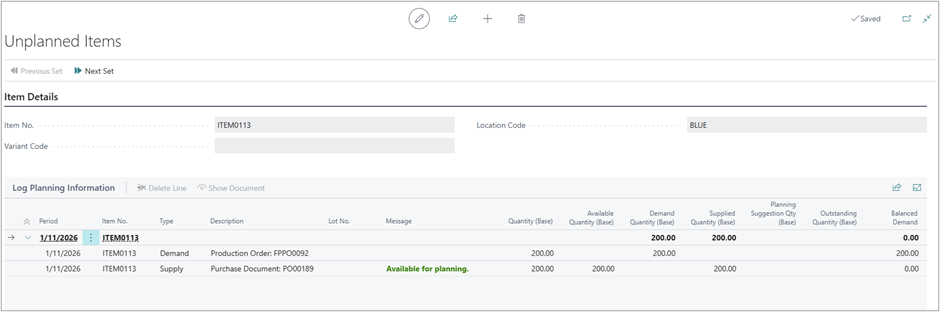
Even if the planning run produces no suggestions for some items (because demand is already covered), Advanced Planning provides a notification that allows users to review calculation details at the worksheet scope via a temporary log: “Calculation completed. No planning lines were created for some items. Click here to review calculation details.”
FactBoxes
Item Details - Planning
This FactBox shows planning parameters from the Stockkeeping Unit (Item + Location + Variant). If the SKU does not exist, it falls back to the Item Card planning settings.
Untracked Planning Elements
The existing Planning Worksheet FactBox remains available to help interpret planning parameters and explain cases where Balanced Demand may not be zero due to planning policies (e.g., reorder point/qty effects).