License Plate Labels
This page describes all label reports available in the License Plating application for Microsoft Dynamics 365 Business Central. For each report, you will find the required setup, the print logic, the entry points where you can trigger the print, and a description of the label layout.
Overview
The License Plating application provides three label print actions accessible from the License Plate Card and the License Plate List:
- Print LPN Labels — Prints internal license plate labels.
- Print SSCC Labels — Prints labels showing only the SSCC value and barcode, typically used when the License Plate contains multiple items or lots.
- Print SSCC per Item/Batch Labels — Prints one label per License Plate / Item / Batch combination, including SSCC, lot or serial number, and item information.
A fourth entry point, Print New License Plate Labels, allows users to print new license plate numbers in advance without assigning them to existing inventory. This scenario
Prerequisite — License Plate Report Selection
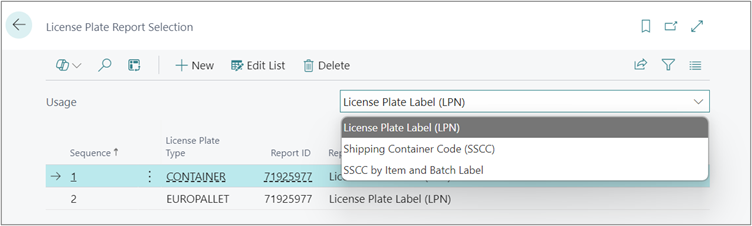
Before any label can be printed from the License Plate Card or the License Plate List, the License Plate Report Selection must be configured. This setup determines which report and which layout are used for each combination of License Plate Type and Label Usage.
The License Plate Report Selection table and page allow users to define which report and layout should be printed based on the License Plate Type and Label Type. This setup is used when performing the actions Print LPN Labels, Print SSCC Labels, and Print SSCC per Item/Batch Labels.
Setup Fields
| Field | Description |
|---|---|
| Usage | Specifies the label type the line applies to: License Plate Label (LPN), Shipping Container Code (SSCC), or SSCC by Item and Batch Label. |
| Sequence | A numeric code indicating the printing order within the same usage group. |
| License Plate Type | The License Plate Type for which this report and layout will be used. Each combination of Usage + License Plate Type must be unique. |
| Report ID | The identifier of the report to run. |
| Report Name | Automatically populated from the Report ID. Read-only. |
| Report Layout | The custom report layout code to apply when printing. Linked to the selected Report ID. |
| Report Layout Description | A descriptive label for the custom layout. Can also be used to look up and populate the Report Layout code. |
⚠️ Important: If the License Plate Report Selection table is empty, no labels can be printed and the following message is displayed:“The Report Selections table is empty. Please define it on the License Plate Report Selection page."
If no entry is found for the selected License Plate Type and Usage combination, the following message is displayed:“No Report or Layout is defined for the selected [License Plate Type] on License Plate Report Selection."
Duplication Restriction: It is not possible to configure the same License Plate Type more than once for the same Usage. If the user tries to do so, the system will display the following error message: “Combination of Usage and License Plate Type already exists.”
Deleting Records: When a user attempts to delete a line, the system will show a confirmation message: “Go ahead and delete?” With the options “Yes” and “No.” If “Yes” is selected, the line will be deleted; if “No” is selected, no action will be taken.
License Plate Label (LPN)
This report prints an internal label for a License Plate. It is the standard label used for warehouse operations and internal identification of physical License Plates.
Print Logic
When Print LPN Labels is triggered, the system checks if a License Plate Report Selection entry exists with a Usage set to License Plate Label (LPN) and the corresponding License Plate Type, then uses the configured Report ID and Report Layout.
When printing from a list with multiple rows selected, all selected License Plates must share the same License Plate Type. If multiple types are selected, the following error is shown:“Labels cannot be printed for multiple License Plate Types."
Where to Print
| Location | Action Path |
|---|---|
| License Plate List | Select one or more records → Print → Print License Plate Label(s) |
| License Plate Card | Open a License Plate record → Print → Print License Plate Label(s) |
Label Layout
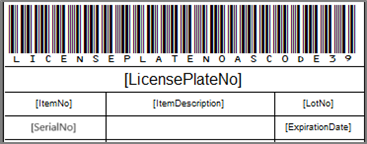
Label dimensions: Width 9.65 cm × Height 3.7 cm. The label data is printed per License Plate line — if a License Plate contains multiple items or lots, one label section is produced per line.
| Section | Field | Description |
|---|---|---|
| Label Body | License Plate No. | The internal License Plate number |
| Label Body | Item No. | The item number associated with the line |
| Label Body | Item Description | The description of the item |
| Label Body | Lot No. | The lot number (if available) |
| Label Body | Serial No. | The serial number (if available) |
| Label Body | Expiration Date | The expiration date of the lot (if available) |
| Barcode | License Plate No. | Code 39 barcode encoding the License Plate No. |
Shipping Container Code (SSCC) Label
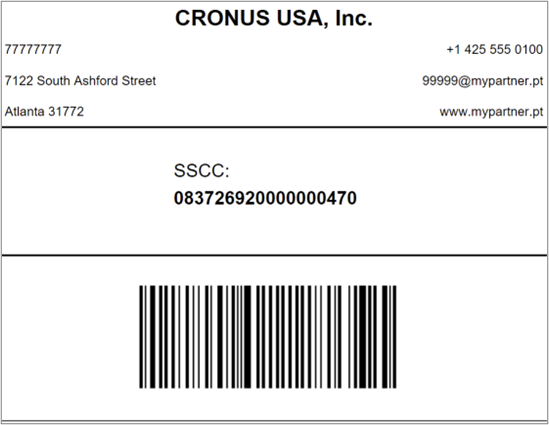
This report prints a compact GS1-compliant shipping label that carries exclusively the SSCC number and its barcode. It is intended for use at the shipping stage when the full item/batch detail is not required on the label (e.g., when the License Plate is a mixed pallet).
Print Logic
When Print SSCC Labels is triggered, the system checks if a License Plate Report Selection entry exists with a Usage set to Shipping Container Code (SSCC) and the corresponding License Plate Type, then applies the correct Report ID and Report Layout.
The same multi-type restriction applies: all selected License Plates must share the same License Plate Type.
Where to Print
| Location | Action Path |
|---|---|
| License Plate List | Select one or more records → Print → Print SSCC Label(s) |
| License Plate Card | Open a License Plate record → Print → Print SSCC Label(s) |
Label Layout
| Section | Field | Description |
|---|---|---|
| Top | Company Name | The company’s legal name |
| Top | VAT Registration No. | The company’s VAT registration number |
| Top | Address | The company’s address |
| Top | City | The company’s city |
| Top | Post Code | The company’s postal code |
| Top | Phone No. | The company’s phone number |
| Top | The company’s email address | |
| Top | Home Page | The company’s website |
| Central | SSCC | The SSCC License Plate No. |
| Bottom | SSCC Barcode (GS1-128) | GS1-128 barcode —(AI 00) SSCC |
SSCC by Item and Batch Label
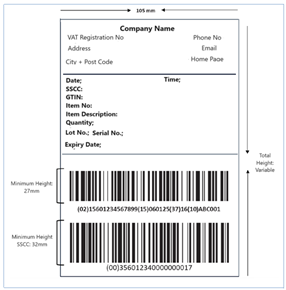
This report produces a detailed GS1-compliant shipping label. Unlike the standard SSCC Label, it prints one label per License Plate / Item / Batch line, making it suitable for single-item pallets or whenever full traceability information is required directly on the shipping label.
Print Logic
When Print SSCC per Item/Batch Labels is triggered, the system checks if a License Plate Report Selection entry exists with a Usage set to SSCC by Item and Batch Label and the corresponding License Plate Type, then prints the associated Report ID and Report Layout.
The same multi-type restriction applies: all selected License Plates must share the same License Plate Type.
Where to Print
| Location | Action Path |
|---|---|
| License Plate List | Select one or more records → Print → Print SSCC per Item/Batch Label(s) |
| License Plate Card | Open a License Plate record → Print → Print SSCC per Item/Batch Label(s) |
Label Layout
One label is produced per License Plate / Item / Batch line. All company information is sourced from Company Information.
| Section | Field | Description |
|---|---|---|
| Top | Company Name | The company’s legal name |
| Top | VAT Registration No. | The company’s VAT registration number |
| Top | Address | The company’s address |
| Top | City | The company’s city |
| Top | Post Code | The company’s postal code |
| Top | Phone No. | The company’s phone number |
| Top | The company’s email address | |
| Top | Home Page | The company’s website |
| Central | Date | Current date at print time |
| Central | Time | Current time at print time |
| Central | SSCC | The SSCC License Plate No. |
| Central | GTIN | Item Reference No. with Barcode type — 14 digits mandatory |
| Central | Item No. | The item number |
| Central | Item Description | The item description |
| Central | Quantity | Quantity in base unit of measure |
| Central | Lot No. | The lot number (printed only if available) |
| Central | Serial No. | The serial number (printed only if available) |
| Central | Expiry Date | The expiration date (printed only if available) |
| Bottom — Barcode 1 (GS1-128) | (01) GTIN | Item Reference No. with Barcode type |
| Bottom — Barcode 1 (GS1-128) | (37) Quantity | Quantity in base unit of measure |
| Bottom — Barcode 1 (GS1-128) | (10) Lot No. | Lot No. (included only if available) |
| Bottom — Barcode 1 (GS1-128) | (21) Serial No. | Serial No. (included only if available) |
| Bottom — Barcode 1 (GS1-128) | (17) Expiration Date | Expiration date (included only if available) |
| Bottom — Barcode 2 (GS1-128) | (00) SSCC | The SSCC License Plate No. |
Print New License Plate Labels
This feature allows users to print new license plate numbers in advance, before any inventory is assigned to them. It is accessible as a standalone report from the Reports & Analysis menu.
Where to Print
| Location | Action Path |
|---|---|
| Reports & Analysis | Search for Print New License Plate Labels |
Setup — Request Page Options
Before printing, the following fields must be filled in on the request page:
| Field | Description |
|---|---|
| License Plate Type | (Mandatory) Specifies the type of License Plate to use for number generation. |
| Label Type | Specifies the type of label to print: License Plate Label (LPN) — generates an internal LPN number; Shipping Container Code (SSCC) Label — generates an SSCC number. |
| Create License Plate Card | When set to Yes, a License Plate Card header is created in the system for each printed number. When set to No, only the label is printed and no card is created. Defaults to Yes. |
| Number of Labels | (Mandatory) Specifies how many labels to print. |
⚠️ If License Plate Type or Number of Labels is left empty, the following error is shown:“The mandatory fields should be filled."
Print Logic
Label Type: License Plate Label (LPN) — Numbers are generated based on the number series defined in the License Plate Nos. field on the License Plating Setup page.Label Type: Shipping Container Code (SSCC) Label — Numbers are created using the SSCC Nos., SSCC Company Prefix, and Check Digit settings. The system validates that this combination results in an 18-digit number. If not, the following error is displayed:“SSCC License Plate Number must have 18 digits. Please check SSCC configurations on Company Information."
If an invalid combination of License Plate Type and Label Type is selected, and the configuration is missing in the License Plate Report Selection, the following error will occur:“The Report Selections table is empty." No labels will be printed in this case.
Label Layout
Both label types — LPN and SSCC — share the same layout within the Print New License Plate Labels report.
The label prints the generated License Plate number along with its corresponding barcode:
| Section | Field | Description |
|---|---|---|
| Label Body | License Plate No. | The generated License Plate or SSCC number |
| Barcode — LPN | License Plate No. | Code 39 barcode encoding the generated LPN number |
| Barcode — SSCC | License Plate No. | GS1-128 barcode encoding the generated SSCC number |
Since these labels are printed before any inventory assignment, no item, lot, or quantity information is included on the label.