Default Planning Flexibility
The Default Planning Flexibility feature allows you to define the default Planning Flexibility to be applied to production order lines created in Manufacturing Essentials.
In standard Business Central, Planning Flexibility determines whether the planning engine can reschedule or resize an existing supply. By default, production order lines are typically created with Unlimited flexibility unless the value is manually changed by the user. With Manufacturing Essentials, you can define the default value that should be applied automatically when production orders are created.
When to Use Default Planning Flexibility
Use this feature when you want to control how flexible production orders should be for planning purposes, depending on their status.
For example, you may want:
- Planned Production Orders to remain flexible while planners are still evaluating supply proposals.
- Firm Planned Production Orders to be protected from planning changes once they are closer to execution.
- Released Production Orders to follow a fixed planning behavior after production has started or is about to start.
By configuring default values by production order status, planners and production teams can apply a consistent planning policy without manually updating each production order line.
Setup
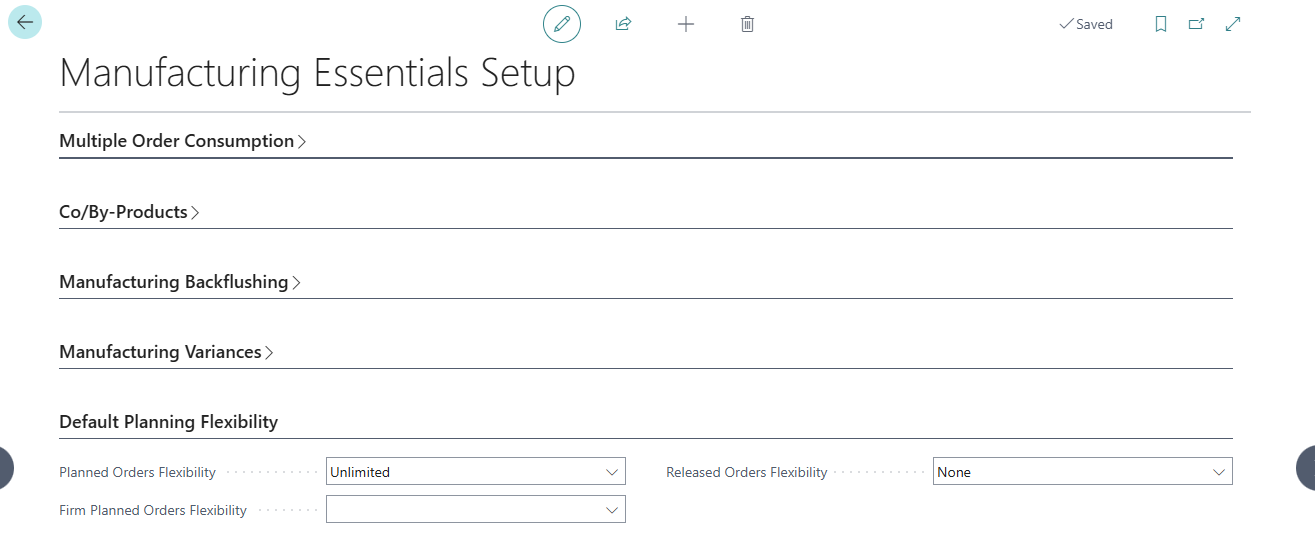
Default Planning Flexibility is configured on the Manufacturing Essentials Setup page.
A dedicated group called Default Planning Flexibility is available with the following fields:
| Field | Description |
|---|---|
| Planned Orders Flexibility | Specifies the Planning Flexibility that should be applied to planned production order lines. This applies to production orders created manually or through the Planning Worksheet or Order Planning. |
| Firm Planned Orders Flexibility | Specifies the Planning Flexibility that should be applied to firm planned production order lines. This applies to production orders created manually or through the Planning Worksheet or Order Planning. |
| Released Orders Flexibility | Specifies the Planning Flexibility that should be applied to released production order lines. |
Each field can be configured with one of the following values:
| Value | Meaning |
|---|---|
| Empty | Manufacturing Essentials does not apply any custom default value. The standard Business Central behavior is used. |
| None | The production order line is not considered flexible for planning changes. |
| Unlimited | The production order line can be rescheduled or resized by the planning engine. This is the default value. |
How It Works
When a production order is created, Manufacturing Essentials applies the Planning Flexibility value configured for the corresponding production order status.
The value is applied to the Planning Flexibility field on the production order lines.
This happens when:
- A Planned Production Order is created.
- A Firm Planned Production Order is created.
- A Released Production Order is created.
- The production order is created manually.
- The production order is created from the Planning Worksheet.
- The production order is created from Order Planning.
For manually created production orders, the Planning Flexibility is applied when the production order is refreshed with Lines = Yes. If a production order line is added manually, the system retrieves the applicable value from Manufacturing Essentials Setup.
Production Order Status Changes
Planning Flexibility is applied when the production order line is created. If the production order status is changed later, the existing Planning Flexibility value on each production order line is kept. The system does not look up the setup again and does not overwrite the value based on the new status.
Planning Worksheet and Order Planning
The Planning Flexibility field on the Planning Worksheet is used by the planning engine during planning calculations. It determines how existing supply suggestions may be rescheduled or resized while planning proposals are being calculated.
Manufacturing Essentials does not change the behavior of the Planning Flexibility field on the Planning Worksheet or Order Planning pages. Instead, when a production order is created from planning, Manufacturing Essentials applies the Planning Flexibility value to the resulting production order lines based on the configuration in Manufacturing Essentials Setup.
Using Empty for Standard Behavior
If one of the Default Planning Flexibility setup fields is set to Empty, Manufacturing Essentials ignores the custom defaulting logic for that production order status. In this case, the system follows the standard Business Central behavior.
This option is useful when you only want to define default Planning Flexibility for specific production order statuses and leave the remaining statuses controlled by standard behavior.
Key Benefits
- Reduces manual updates on production order lines.
- Ensures consistent planning behavior by production order status.
- Helps protect production orders from unwanted planning changes.
- Keeps standard planning behavior available by using the Empty option.
- Applies consistently to production orders created manually, from Planning Worksheet, or from Order Planning.